
Replace Vercel, Sentry & Plausible for $5/Month (Real Setup)
I replaced four paid subscriptions ($152/mo) with one $5/mo self-hosted server: real deployment, a…
A year ago I published a plugin I built with AI in fifteen minutes. Buttons, a database table, an admin dashboard — it worked, so I shipped it and moved on. I never once asked whether AI generated WordPress plugin security was something I could actually trust, or just something I’d assumed.
So this time I built another one the same way, and before I touched a single line myself, I ran WordPress.org’s own security scanner against it. Then I went further, because a warning list isn’t proof of anything: I tried to actually break the thing.
Here’s the short version: the official tool found 21 issues. Two rounds of fixes took that to zero.
Get free WordPress & AI tips
Join 500+ readers. No spam, unsubscribe anytime.
And the one bug I could actually exploit for real was never on that list at all. 🎯
Everything here is free and runs on your own machine.
wp plugin install plugin-check --activateI asked the assistant for a “Was this helpful?” widget: Yes/No buttons under a post, votes stored in the database, a summary on an admin page. Nothing exotic.
I picked it on purpose. It touches every place a beginner plugin usually gets hurt: an AJAX endpoint anyone can hit without logging in, a database table the plugin owns, an admin page only the site owner should see, and a settings form an admin can change. Four different attack surfaces in maybe eighty lines of real logic — dense enough to be worth checking, small enough to actually finish checking in one sitting.
Compare that to what most “build a plugin with AI” tutorials show you: a shortcode that prints some text, or a widget that reads an option. Those genuinely have nothing to attack. This one does, and that’s exactly why it’s the more honest test.
The prompt I actually used had no security words in it anywhere — no “secure,” no “sanitize,” no “nonce.” Just what I wanted it to do. That’s the point: I wanted the default, not the graded version.
One honest caveat before anything else: the assistant that wrote this plugin is the same tool I use every day, tested by an isolated instance that had no idea an audit was coming. I’m not claiming a blind test — I’m claiming a single-blind one, and I’d rather tell you that than pretend otherwise.
I ran wp plugin check — WordPress Plugin Check, the tool WordPress.org uses to review real plugin submissions — against the first thing the assistant handed back.
21 findings: 2 errors, 19 warnings. And here’s the part that actually surprised me: zero nonce problems, zero missing capability checks, zero unescaped output. The code checked its nonce. It called wp_unslash() before sanitizing input, which is the exact mistake I’ve personally shipped before. It gated both admin pages behind current_user_can('manage_options').
What Plugin Check actually flagged was almost entirely one pattern, repeated: SQL built with {$table} and {$column} dropped straight into the query string instead of going through $wpdb->prepare() properly, plus a missing readme file and an outdated plugin header. Real findings — just not the ones I expected.
This is the part nobody else checks. A tool telling you something is unsafe and something actually being unsafe are two different claims, and only one of them is provable.
So I logged in as a real WordPress user, grabbed a live nonce off the actual page, and fired six real requests at the running plugin — the same way an attacker, or just a careless script, would. Not curl commands typed by hand and eyeballed — a script that checks what actually landed in the database afterward, because a request that returns a friendly JSON response and a request that actually stored something are not the same event. I’ve been burned by that gap before: a tool I built once looked like it was working in every test, right up until someone checked whether the database row it claimed to write was actually there.
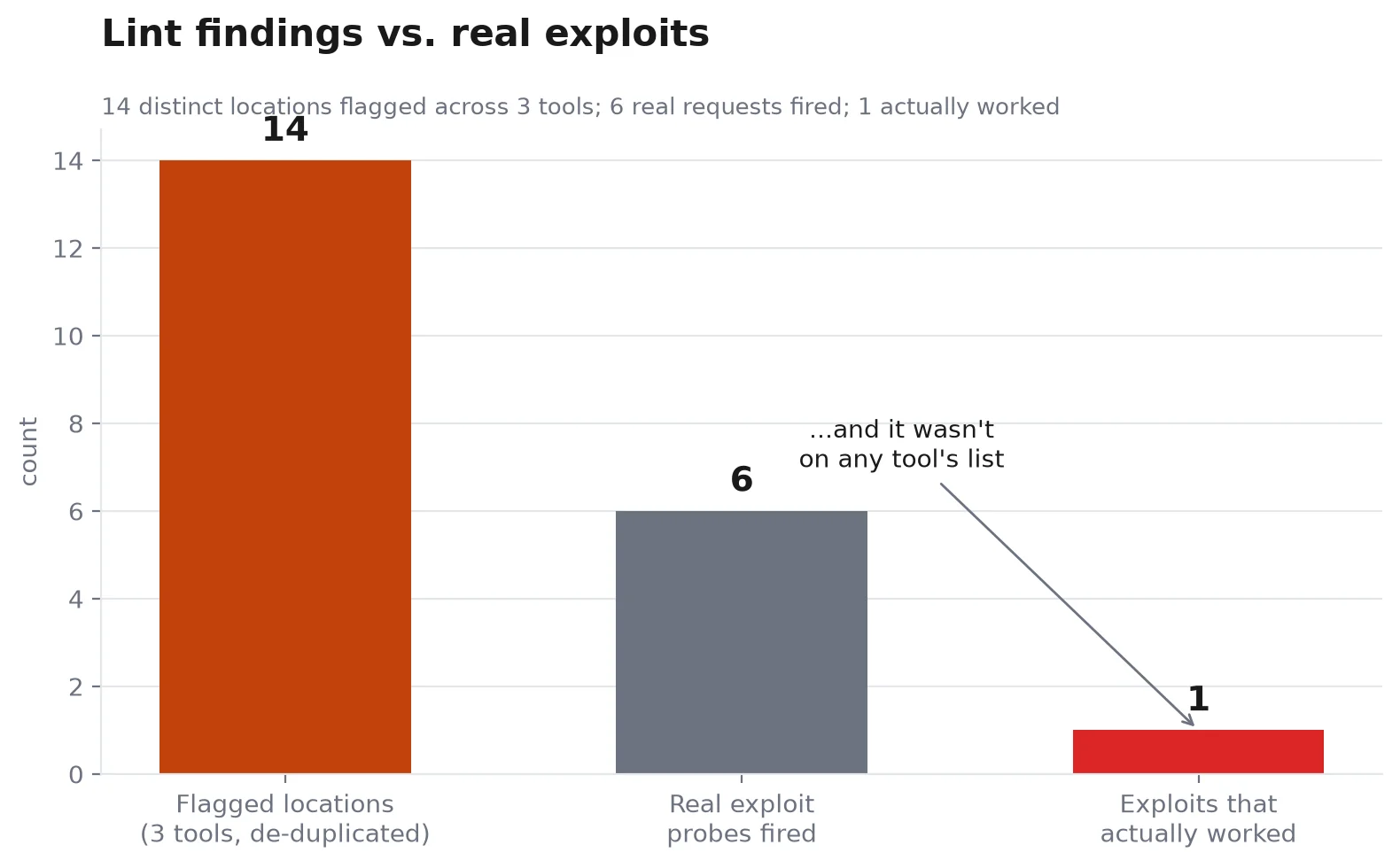
1 OR 1=1 as the post ID, going for SQL injection. Rejected — absint() turned it into a plain integer before it ever reached the query.wp_unslash() was handled correctly. It was.Five attacks, five failures. Plugin Check’s flagged SQL pattern — the raw {$table} interpolation — turned out to be exactly what it looked like: untidy, not exploitable. Every value going into those queries was already a validated integer or one of two hardcoded strings before the SQL ever ran.
One attack worked, and it wasn’t on Plugin Check’s list, or PHPCS’s, or PHPStan’s.
| Plugin Check + PHPCS + PHPStan (static) | Real requests fired | |
|---|---|---|
| Distinct issues flagged | 14 | — |
| Attacks attempted | — | 6 |
| Actually exploitable | — | 1 |
| What it was | not flagged by any tool | ballot stuffing |
Fourteen is the honest number, not the raw one — Plugin Check and PHPCS flagged the same eight lines, just twice each, once per tool. I checked file-and-line for overlap rather than just adding the totals, because reporting 38 would have been a real number technically, and a misleading one in practice.
No — and this plugin proves both halves of that sentence.
The nonce genuinely stopped forged requests. What it doesn’t stop is the same valid request, repeated.
I wrote a tiny script that pulled a real nonce off the page and voted “Yes” twenty times in a row. The database accepted every single one — the count went from 1 to 21. The only thing standing between a visitor and unlimited votes was a note in the browser’s local storage, which a script simply doesn’t have.
That’s not a nonce failure. It’s a missing-rate-limit failure, and it’s invisible to every tool I ran, because none of them ask “what happens if this exact request runs a thousand times?”
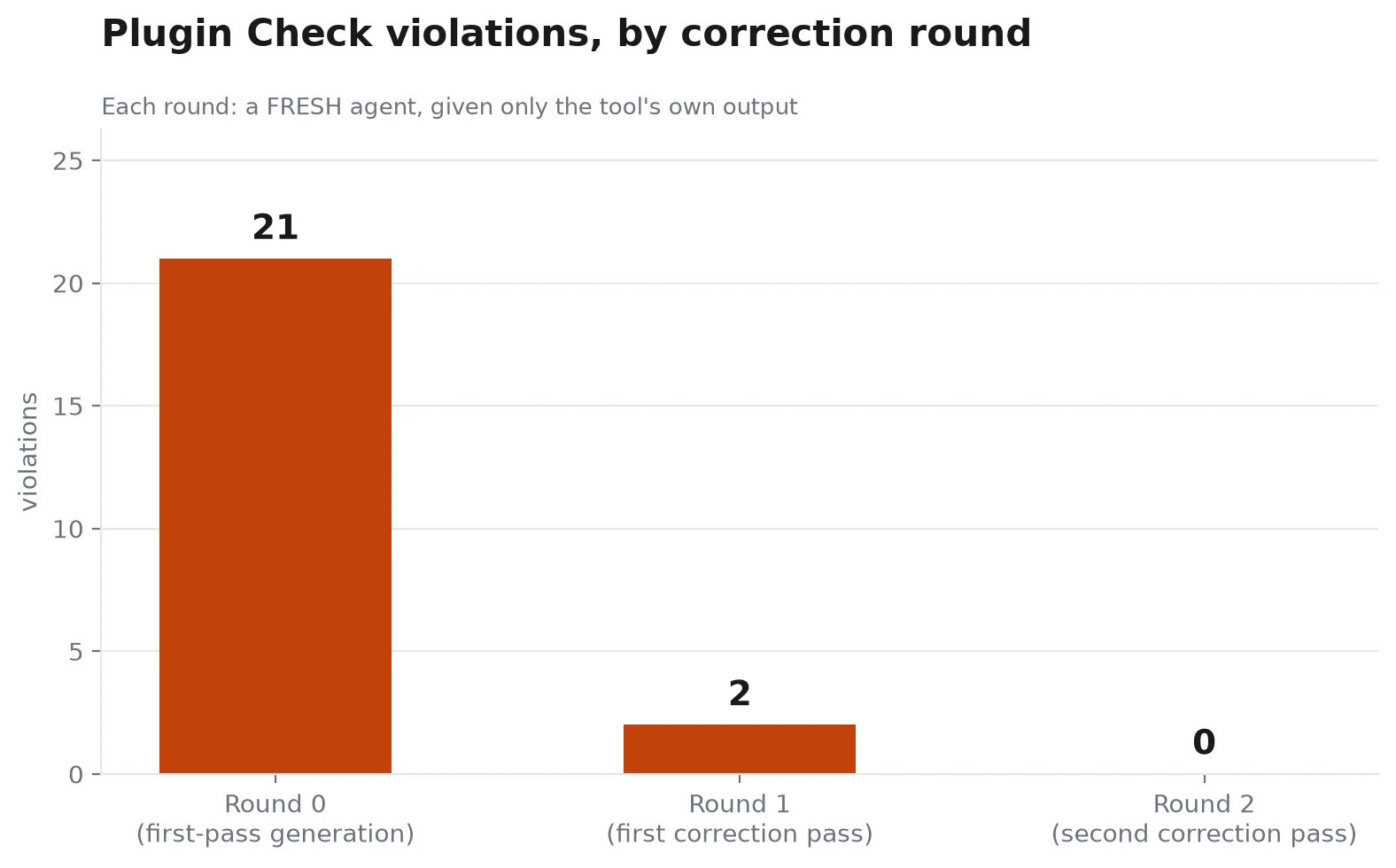
I fed Plugin Check’s own output straight back to a fresh assistant session — the real 21-line report, not my summary of it — and asked it to fix every finding.
Round one: 21 → 2. It rewrote every SQL call to use WordPress 6.2’s %i placeholder correctly, added real object caching, and wrote a readme file that hadn’t existed. That readme immediately introduced two new findings of its own — an outdated “tested up to” version and a description that ran over the character limit.
Round two: 2 → 0, fixing exactly those two lines.
Two rounds. Roughly nine minutes total, timed for real rather than guessed at. And the vote-stuffing bug was still sitting there afterward, completely untouched — because getting Plugin Check to say “no errors found” was never the same question as “is this actually safe.”
Trusting “it works” as your only test. My own plugin from last year still has no security section written about it anywhere. It works. That was never the same claim as safe.
Auditing AI code with the same AI that wrote it. Asking the assistant to grade its own homework tells you what it believes about its own work, not what’s actually true. Use the tool the WordPress plugin reviewers actually use.
Treating a clean linter run as the finish line. Twenty-one violations really did go to zero. The one exploitable bug was never touched by that process, at any point, because static analysis reads code — it doesn’t run it against the questions that actually matter, like “what if someone sends this exact same request 500 times?”
Skipping wp_unslash() before sanitizing input. I’ve personally shipped this exact bug before. This plugin got it right on the first attempt, which is worth noticing precisely because it’s the mistake that’s easiest to make and hardest to catch by reading.
Is AI generated code secure? WordPress builders keep assuming yes.
This one held against five of six real attacks — no nonce, XSS, SQL injection, missing capability checks. It did have one real gap: unlimited vote stuffing. Test your own before you trust “it works.”
What does Plugin Check actually test?
Coding standards, security patterns like unescaped output and unprepared SQL, and WordPress.org submission requirements. It’s static analysis — it reads your code, it doesn’t run it against real requests.
Does a valid nonce mean a request is safe?
It means the request came from an active session on your site. It says nothing about what that account is allowed to do, and nothing about how many times the exact same valid request gets repeated.
How long does it really take to build WordPress plugin with AI?
About four minutes to a working install, about nine to a Plugin-Check-clean one — both timed, not estimated. Getting to actually secure took a sixth check no automated tool ran.
Can I run these checks on my own plugin?
Yes — that’s the actual point of this piece. wp plugin check <your-plugin> costs nothing and takes under a minute. Every script and prompt behind this piece is published; run them against your own plugin and see what comes back.
What’s the actual fix for the vote-stuffing bug?
Track votes server-side per visitor instead of trusting the browser. A signed cookie, an IP-plus-post-ID row in the votes table, or a rate limit on the AJAX action itself would all close it. I haven’t shipped that fix here on purpose — the point of this piece is what the audit found, not a finished, hardened plugin.
Run Plugin Check on whatever AI-generated code is already live on your site. It’s free, it’s the same tool plugin reviewers use, and it takes less time than reading this post.
Then go further than the tool does. Ask what happens if a valid request gets repeated. Ask whether a valid login actually proves permission, not just identity.
Those are the questions that catch what static analysis structurally can’t — because they’re about behavior, not patterns in the source.
Twenty-one violations reaching zero is a real, checkable win. It just isn’t the same win as “this plugin is secure.” Only one of those two claims was true here, and the tool that would have told you which one never got asked the question.
If you haven’t built your first AI-generated plugin yet, start here — then come back and run this checklist on it.