
Replace Vercel, Sentry & Plausible for $5/Month (Real Setup)
I replaced four paid subscriptions ($152/mo) with one $5/mo self-hosted server: real deployment, a…

The WordPress vs static site argument is fought almost entirely with numbers nobody measured. I went looking for a straight answer to one question: should I build my next site on WordPress, or generate it as static files?
What I found was a table. One top-ranking guide publishes time-to-first-byte figures — 200 to 800 milliseconds for WordPress, 20 to 100 for static — and never says what hardware it ran on, what page it requested, what tool it used, or how many times it tried.
That is a range wide enough to be right no matter what happens — and Google’s AI summary already repeats those numbers back to me as fact.
Get free WordPress & AI tips
Join 500+ readers. No spam, unsubscribe anytime.
So I stopped reading and built all three stacks on one machine at home, measured them with scripts I’m publishing, and got an answer that surprised me. 🎯
The short version: static beat WordPress by 96×. Then I turned caching on, and the gap collapsed to 0.08 milliseconds.
Everything runs on one Linux machine with Docker. No cloud account, no card, nothing to sign up for.
Mine ran in a throwaway container on an Ubuntu Optiplex in my house — which is why I’m careful below about which numbers I’ll stand behind.
Benchmark WordPress on one machine and a static site on another, with different themes and different content, and you haven’t compared platforms — you’ve compared two different websites. That’s why most of these numbers don’t mean much.
So I ran one WordPress install with 200 identical posts, behind four nginx server blocks:
| Port | What it is | |
|---|---|---|
| A | 8081 | WordPress, no page cache |
| B | 8082 | The same WordPress + nginx fastcgi_cache |
| C | 8083 | A static mirror of A, made with wget |
| A′ | 8084 | A second door to A, identical config |
For WordPress vs static HTML to mean anything, both sides need the same HTML — so the static side is a wget mirror of the WordPress site, not a separately-built Hugo one. That’s deliberate: it makes the HTML byte-identical.
A, B and A′ returned the same md5. C differed by 165 bytes — wget rewriting absolute URLs to relative ones, and nothing else.
So any speed difference belongs to the serving path. Not the theme, not the content, not the page size.
A′ is the important one, and no comparison I read had anything like it.
It’s the same stack as A, same PHP-FPM pool, identical config. It is A. If my measurements are any good the two must come out the same — and if they don’t, my machine is too noisy and every other number here is garbage.
I ran it first, 160 rounds, alternating which went first:
A  median TTFB   33.6958 ms
A' median TTFB   33.6912 ms
ratio            0.9999   (drift 0.01%)
gap              0.0047 ms   against an IQR of 0.75 ms
The two identical stacks landed 0.01% apart — under one percent of the ordinary jitter. That’s the receipt that lets me report everything else.
💡 This is the check to demand from anyone showing you a benchmark. If they can’t tell two identical things apart, they can’t tell two different things apart either.
Every static site vs WordPress speed claim you have read starts here, and this part is true: enormously faster — against WordPress with no caching.
I hit each stack 185 times, rotating the order every round so a busy moment on my machine couldn’t land on one stack and stay there.
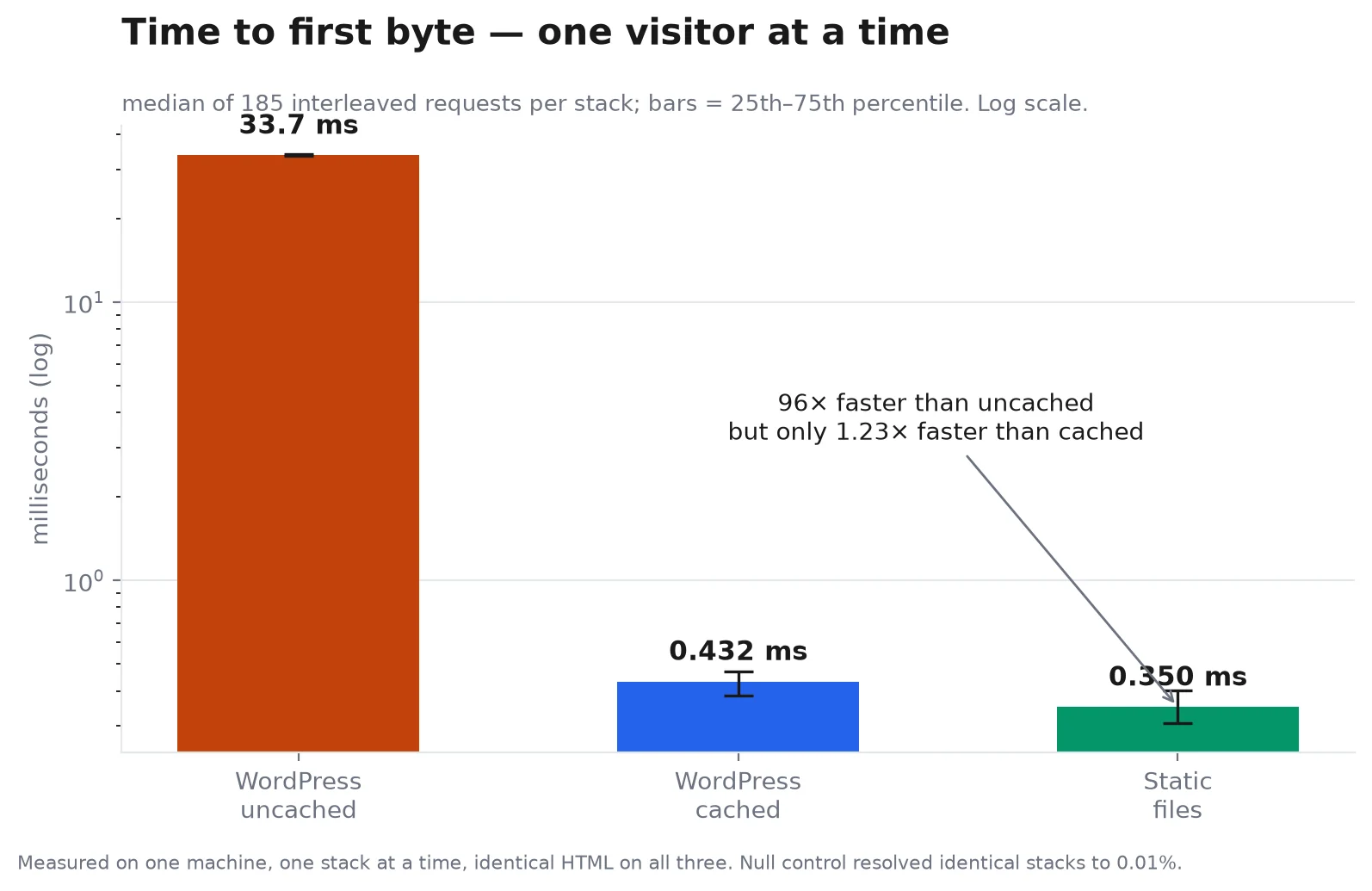
| Stack | Median TTFB | 25th–75th | vs uncached |
|---|---|---|---|
| WordPress, uncached | 33.70 ms | 33.44 – 33.98 | 1× |
| WordPress, cached | 0.432 ms | 0.384 – 0.471 | 78× faster |
| Static files | 0.350 ms | 0.305 – 0.400 | 96× faster |
Ninety-six times. That’s the number that sells the switch, and it’s real. It’s also the wrong comparison.
Look at the middle row again. Cached WordPress is 78× faster than uncached WordPress — and it’s the same WordPress. Same plugins, same theme, same database.
The only change is nginx keeping the finished HTML and handing it out instead of waking PHP.
Which puts static at 1.23× faster than cached WordPress. Not 96×. Not 10×.
In absolute terms that’s 0.082 milliseconds.
What does 0.082ms mean in practice? It is three orders of magnitude smaller than the time a packet takes to reach your server and come back. It vanishes into the noise of the internet before the page starts rendering.
Every guide comparing static to WordPress compares it to the uncached configuration. Nobody runs an uncached WordPress site on purpose.
One visitor at a time is the easy case. I pushed 1, 10 and 50 concurrent connections at each stack, three runs each.
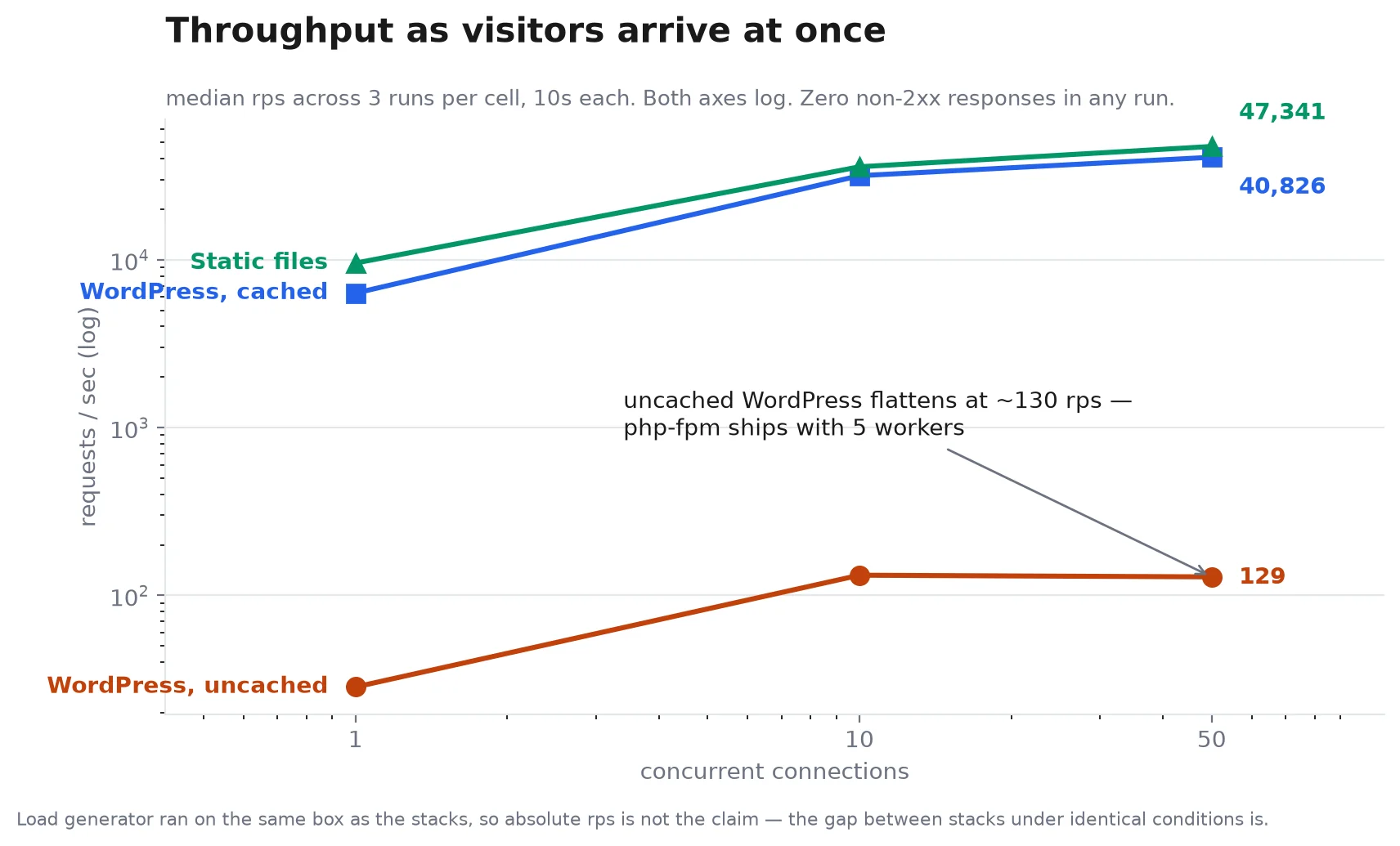
| Concurrency | WP uncached | WP cached | Static |
|---|---|---|---|
| 1 | 28 rps | 6,323 rps | 9,551 rps |
| 10 | 132 rps | 31,697 rps | 35,816 rps |
| 50 | 129 rps | 40,826 rps | 47,341 rps |
Uncached WordPress hits a wall at about 130 requests per second and stays there — PHP-FPM’s default of five worker processes. Five requests at a time, no matter how many people show up.
Cached WordPress and static both keep climbing, and stay within about 16% of each other all the way up. Zero failed responses anywhere, on any stack.
The honest headline isn’t “static is faster than WordPress”. It’s that caching is faster than not caching, by 78× — and static adds a rounding error on top.
Everything I measured, in one place:
| WordPress (cached) | Static | |
|---|---|---|
| Median TTFB | 0.432 ms | 0.350 ms |
| Requests/sec at 50 concurrent | 40,826 | 47,341 |
| Page HTML | 75,773 bytes | 75,608 bytes |
| Assets that actually load | 14 of 16 | 8 of 16 |
| Memory under load | 463.9 MiB | 38.6 MiB |
| Disk | 242.7 MiB | 40.6 MiB |
| Smallest DigitalOcean droplet that fits | $6/mo (1 GB) | $4/mo (512 MB) |
| Search, forms, comments | work | broken |
Two rows deserve a second look, because they’re the ones that actually decide this.
Memory is where static wins properly. WordPress needs MariaDB, PHP-FPM and nginx — 463.9 MiB with traffic on it. Static needs nginx alone: 38.6 MiB.
That’s 12× less memory and 6× less disk, and unlike the speed difference it isn’t a rounding error. It’s the gap between DigitalOcean’s $4/month 512 MB droplet and the $6/month 1 GB one — a real, if modest, $24 a year.
And that “8 of 16” row is not static being lighter. I’ll get to it.
This is the static site generator vs WordPress question I actually wanted answered, and the one nobody measures. The only person I found writing about it was a developer in 2021 whose workflow fell apart as his archive grew — a good post, with no numbers in it.
So I measured the cost of publishing one more post at three archive sizes.
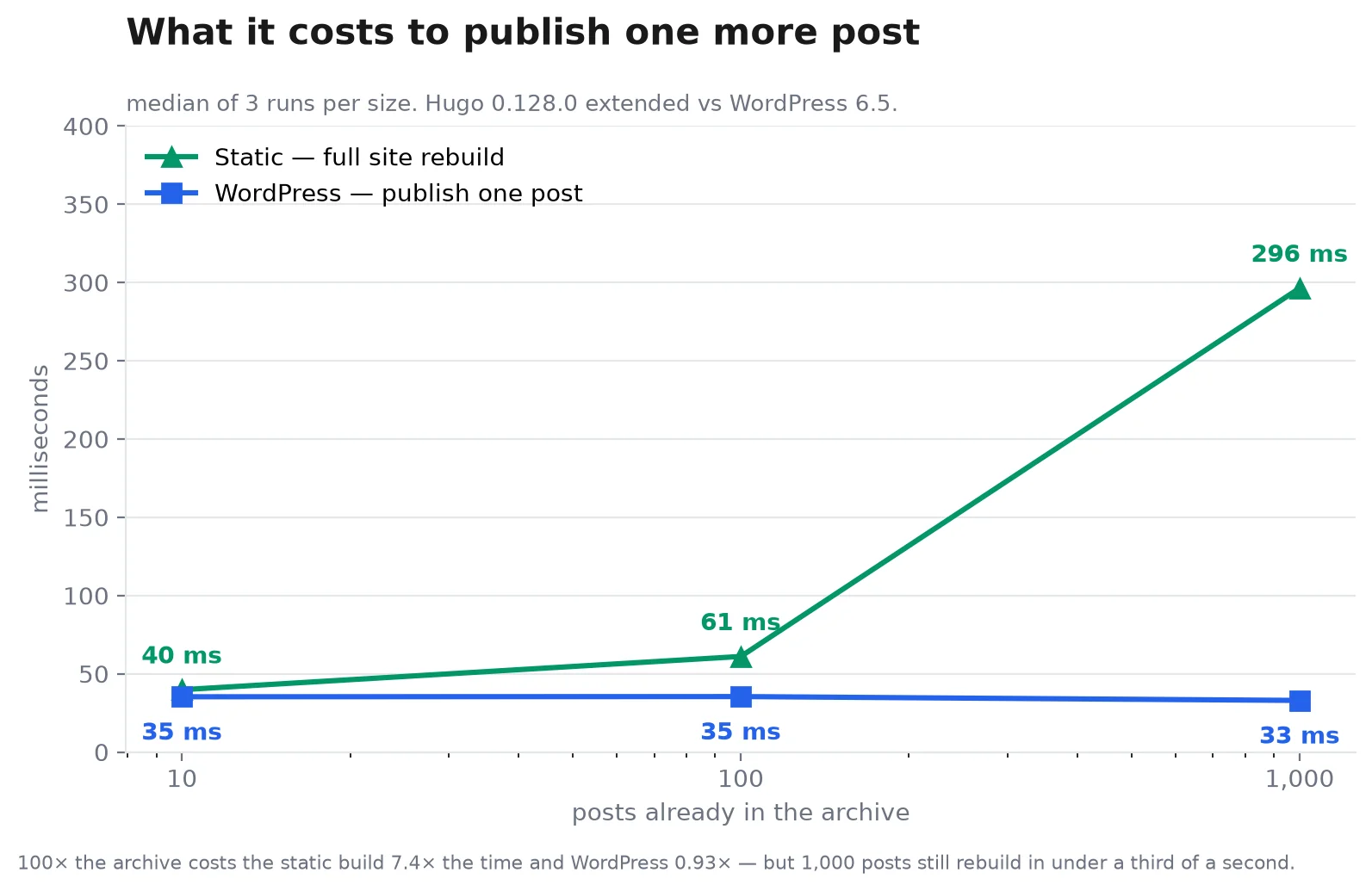
| Archive size | Static (full rebuild) | WordPress (publish one post) |
|---|---|---|
| 10 posts | 40 ms | 35 ms |
| 100 posts | 61 ms | 35 ms |
| 1,000 posts | 296 ms | 33 ms |
Both camps are a little wrong.
Static defenders are wrong that build time is nothing. Multiply the archive by 100 and the rebuild takes 7.4× longer. That curve is real and keeps going.
The 2021 post is wrong that it falls apart. At a thousand posts, a full rebuild takes 296 milliseconds. A third of a second. If you publish weekly, you will not notice this in your lifetime.
WordPress stays flat — 33 ms at a thousand posts, statistically identical to 35 ms at ten — because publishing is one database insert regardless of how much you’ve already written.
So the authoring-loop objection is directionally true and practically irrelevant at blog scale. Revisit it at 50,000 pages; under a few thousand it’s a non-issue.
Here’s where the piece changed my mind.
I put the three things a normal blog has onto the WordPress site — a contact form, site search, comments — exported it the way someone without a paid plugin would, with wget, then tried every feature against the export.
Five of six were broken.
| Feature | WordPress | Static export |
|---|---|---|
| Site search | works | returns the homepage |
| Contact form submit | works | 404 |
| Posting a comment | works | 404 |
comment-reply.js |
loads | 404 |
| RSS feed | works | works, but frozen at export time |
| Comment form on the page | works | still renders, posts nowhere |
Search made me sit up. On the export, /?s=fixture returns HTTP 200 — not a 404, a completely normal successful response. A static server has no idea what ?s= means, so it ignores it and hands back the homepage.
My first version of this test checked status codes only, and told me “site search: still works.” It does not. I had to compare the page bodies to catch it — and if I’d trusted the status code, I’d have published the opposite of the truth.
And the contact page is worse, because it looks completely fine:

That’s the exported site. Name, email, subject, message, Submit — and a visitor who fills it in, hits the button, and 404s into nothing.
You don’t get an error report, because nothing looks broken. You just stop hearing from people.
This also explains the “8 of 16 assets” row above. The static page isn’t 90KB lighter because it’s leaner — it’s lighter because six files it asks for aren’t there, including the block-navigation CSS and JavaScript.
Benchmarking WordPress with caching off. This is the big one. Every “static is 10× faster” claim I could find compares against a configuration nobody deploys. Turn on page caching and you recover 78× of the 96×.
Trusting a static site vs WordPress speed table with no method attached. If it won’t tell you the hardware, the tool, the page and the number of runs — and shows no spread around its figures — it’s a guess with decimal points.
Costing the hosting but not the workflow. The $2/month you save is real. So is the afternoon spent rebuilding your contact form on a third-party service, and every future post going through a build step instead of a Publish button.
Assuming an export keeps things working. It doesn’t, and it fails quietly. Go static deliberately — pick a forms service, pick a search service (or drop search), pick a comments host. Don’t export a dynamic site and hope.
My lab was a container on a home Optiplex that also runs my other work. That is not clean benchmark hardware and I won’t pretend otherwise.
So I claim the ratios between stacks, not the absolute milliseconds. Every stack was measured in the same rounds, in rotating order, minutes apart, and the null control resolved identical stacks to 0.01%.
Under those conditions “static is 1.23× cached WordPress” is solid. “Static serves in 0.35ms” is true of my box and nothing else.
I’m also not claiming anything about SEO — everyone asserts static ranks better, and I can’t test it in an afternoon. I didn’t test managed WordPress hosting or Netlify’s free tier either. Different question, different piece.
Is a static site faster than WordPress?
On WordPress vs static HTML, against uncached WordPress, yes — 96× on my measurements. Against WordPress with nginx page caching, 1.23×, which is 0.08 milliseconds. On a real connection that difference is invisible.
Is a static site worth it for a blog I update weekly?
For speed alone, no — caching gets you within a rounding error. For a lower bill and less to maintain, maybe: 12× less memory and no database to patch.
Will my contact form work after converting to static?
No. Mine returned 404 while still displaying a perfectly normal form. If you go static you need a forms service, and you need to know that before you migrate, not after.
Can I keep WordPress and get static speed?
Largely, yes — that’s the finding. Full-page caching took the same WordPress install from 33.70 ms to 0.432 ms without changing a single plugin or theme file. It’s the cheapest performance work available to you.
How much does each one actually cost to host?
Static fits DigitalOcean’s $4/month 512 MB droplet; WordPress needs the $6/month 1 GB tier at minimum. Around $24 a year, before you count your own time.
What about search on a static site?
Site search stops working and does it silently — HTTP 200, homepage returned. You’d need a client-side index or a hosted search service.
Here’s the rule I’d give a friend, and it isn’t the one I expected to write.
If your site has forms, comments, search, or anything a visitor submits — stay on WordPress and turn on full-page caching. That one change bought 78× on my measurements.
You keep everything that works, and the remaining gap is a fraction of a millisecond nobody will perceive.
Reach for a static site generator vs WordPress only when your site genuinely has nothing dynamic in it — a portfolio, documentation, a landing page, an archive that only you update. Then you get real wins: 12× less memory, a cheaper box, no database to keep patched, and nothing to break at 3am.
What should not decide it is a speed table with no method behind it. The 96× is real and it’s measuring the wrong thing.
If you take one thing from this: go and turn caching on. It’s free, it takes an afternoon, and it’s most of the benefit people switch platforms for. You might try it before you rebuild anything.
Every script and raw measurement behind this post is published — the null control, the timing harness, the export probes, all of it.
Run them on your own box and tell me if you get something different. I’d genuinely like to know. 💡
Related: How I Connected WordPress to Claude AI With an MCP Server