
How to Check if WordPress Supports WebP in 60 Seconds (Site Health Method)
I’ll be honest with you – I spent way too long trying to figure…
Fourteen times. That’s how often my homepage pointed at a dead copy of my site, and a Yoast canonical pointing to staging told Google it was the real one.
Someone pointed it out to me, not anything on my own site. I checked every setting I knew, and every one was correct.
The address wasn’t in a setting at all. It was in a table Yoast keeps for itself. Below is how I found it, the half-fix that made things worse, the complete one, and the extra trap that made my fix look like it had failed.
Get free WordPress & AI tips
Join 500+ readers. No spam, unsubscribe anytime.
One note before we start. The screenshots come from a copy of my site that I rebuilt from the backup I took before the fix, so I could break it again and capture every step. The real site is already repaired.
mysql or mariadb clientwp_yoast_indexable and wp_yoast_seo_linkswp_ (mine is wp_)Open your homepage, view the page source and search for canonical. Or let the terminal do it in one line:
curl -s https://ceeveeglobal.com/ | grep -oE '<link rel="canonical"[^>]*>|og:url" content="[^"]*"'
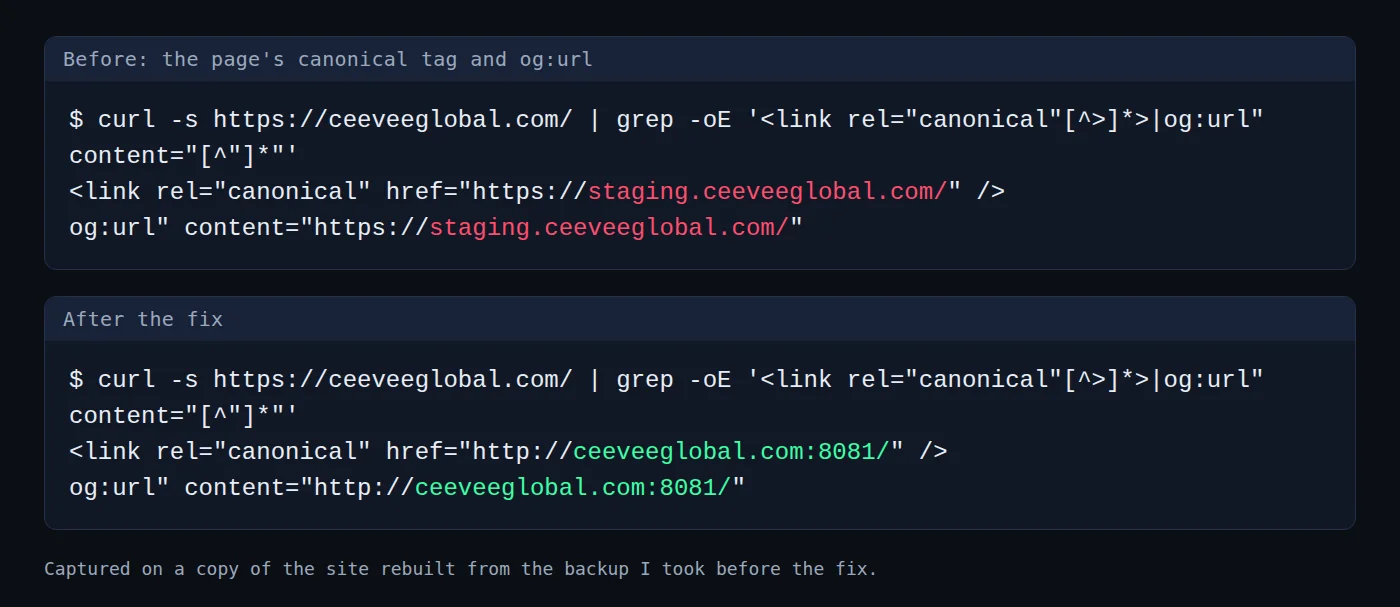
You should see: your live address in both lines. If you see staging, localhost or an old domain, keep going. This is what I saw:
(The :8081 in the second panel is just the port my copy of the site runs on.)
A canonical tag is one line in your page’s code that names the original address of that page. og:url is a similar line that Facebook and LinkedIn read when someone shares your page.
Those two were only part of it. My homepage held 14 references to the staging address: one canonical, one og:url, and twelve more inside the structured data, a block of code in the page that tells search engines what the page is.
Google calls a rel="canonical" link “a strong signal that the specified URL should become canonical”. That is why this one line matters.
Every guide sends you to the same places first. I went through all of them, and each one was clean.
| Where I looked | How I checked | What I found |
|---|---|---|
| Home and Site address settings | wp option get home, wp option get siteurl |
Both correct |
| Code overriding them | wp eval 'echo home_url();', then a search of wp-config.php |
Correct at runtime, nothing set |
| The page’s own canonical field | Yoast’s field on the page, plus the _yoast_wpseo_canonical meta |
Empty |
| The options table | A search for the word staging |
One row, an old Elementor log |
| The posts | The same search on the content and the GUID | Nothing |
Here are the checks. The first block is the WP-CLI part:
wp option get home
wp option get siteurl
wp eval 'echo home_url();'
grep -E "WP_HOME|WP_SITEURL" wp-config.php
And this is the database part:
SELECT COUNT(*) FROM wp_options WHERE option_value LIKE '%staging.ceeveeglobal%';
SELECT COUNT(*) FROM wp_posts WHERE post_content LIKE '%staging.ceeveeglobal%' OR guid LIKE '%staging.ceeveeglobal%';
SELECT COUNT(*) FROM wp_postmeta WHERE meta_key='_yoast_wpseo_canonical';
You should see: correct addresses from the first three commands and no output from the grep. The three counts came back 1, 0 and 0.
I had six clean checks and one wrong page. That told me the address wasn’t stored where WordPress keeps its settings.
It also explains why the usual advice, “check your SEO plugin settings”, goes nowhere. The plugin’s settings screen was right. The wrong address lived somewhere the settings screen never reads.
A permalink is a page’s full web address. Yoast keeps a table called wp_yoast_indexable, with a saved copy of the permalink of every page. Each row has a canonical column. When that column is empty, Yoast quietly uses the address it saved.
The canonical column was empty on every row of mine. So I counted how many saved addresses still held the staging domain.
Back up wp_yoast_indexable and wp_yoast_seo_links first, and open the backup file to check it isn’t empty. Then run this:
SELECT 'indexable rows', COUNT(*) FROM wp_yoast_indexable
UNION ALL SELECT 'permalink on staging domain', COUNT(*) FROM wp_yoast_indexable WHERE permalink LIKE '%staging.ceeveeglobal%'
UNION ALL SELECT 'og_image on staging', COUNT(*) FROM wp_yoast_indexable WHERE open_graph_image LIKE '%staging.ceeveeglobal%'
UNION ALL SELECT 'twitter_image on staging', COUNT(*) FROM wp_yoast_indexable WHERE twitter_image LIKE '%staging.ceeveeglobal%'
UNION ALL SELECT 'og_image_meta on staging', COUNT(*) FROM wp_yoast_indexable WHERE open_graph_image_meta LIKE '%staging.ceeveeglobal%'
UNION ALL SELECT 'seo_links on staging', COUNT(*) FROM wp_yoast_seo_links WHERE url LIKE '%staging.ceeveeglobal%'
UNION ALL SELECT 'permalink NULL', COUNT(*) FROM wp_yoast_indexable WHERE permalink IS NULL
UNION ALL SELECT 'permalink_hash consistent', COUNT(*) FROM wp_yoast_indexable WHERE permalink IS NOT NULL AND permalink_hash = CONCAT(LENGTH(permalink),':',MD5(permalink))
UNION ALL SELECT 'permalink not NULL', COUNT(*) FROM wp_yoast_indexable WHERE permalink IS NOT NULL;
You should see: zero on every staging line. This is what I saw:
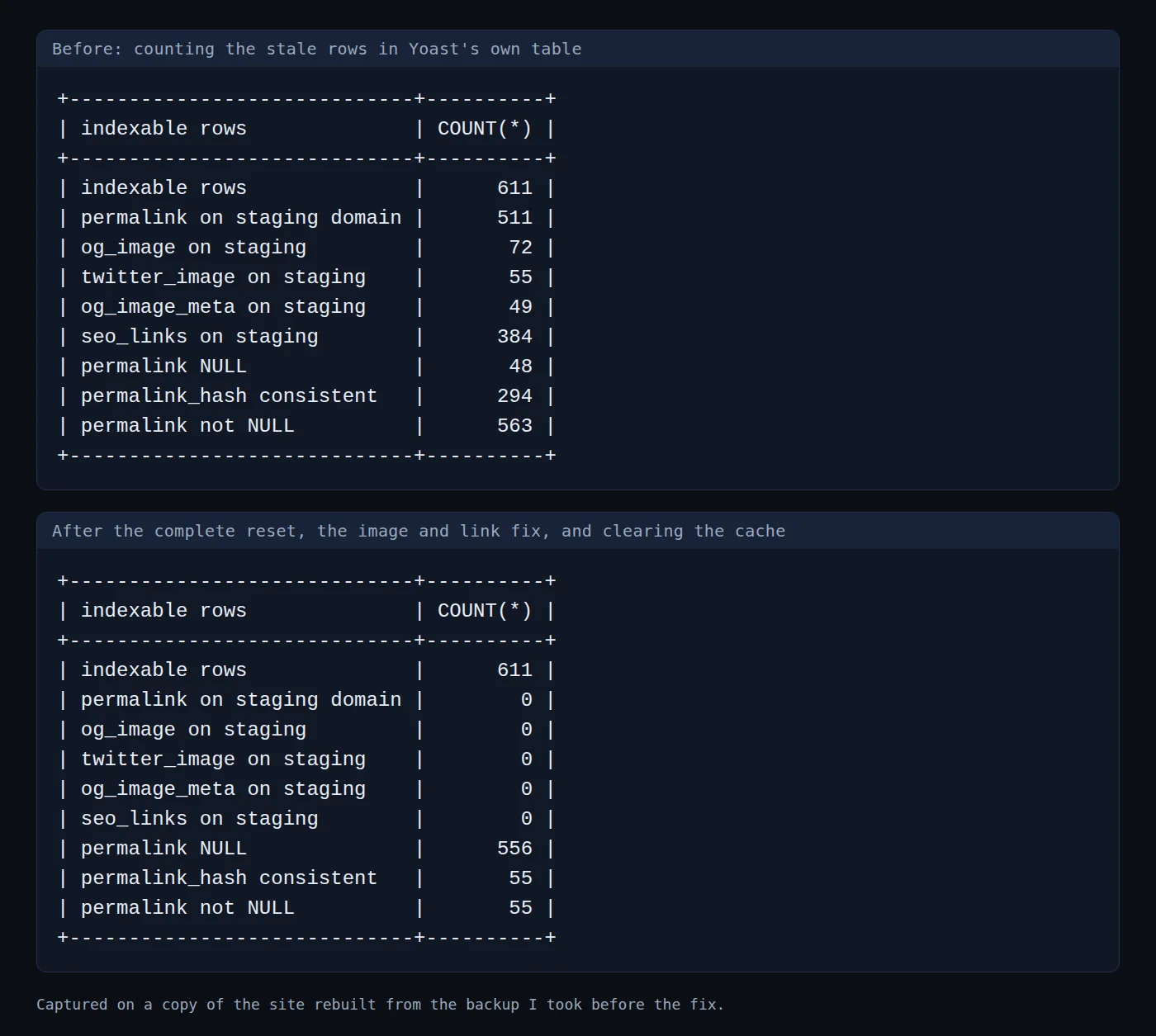
There were 611 rows, and 511 of them still held the staging address. Here is what each line of the result means:
permalink on staging domain counts the stale page addresses. Mine was 511.og_image, twitter_image and og_image_meta are the picture addresses Yoast keeps for social sharing. They held the staging domain in 72, 55 and 49 rows.seo_links on staging counts the internal-link records in wp_yoast_seo_links. Mine held it in 384 rows.permalink NULL counts rows with no saved address. It matters in Step 5.All of it was left over from before the move from staging to live. I had decommissioned my staging site on 13 June 2026, so the address these rows pointed at didn’t exist any more.
Yoast has its own reset for this. In its code it is called reset_permalink, and it runs when your home address changes. It changes three columns:
'permalink'      => null,
'permalink_hash' => null,
'version'        => 0,
I only knew about two of them. So I emptied permalink and permalink_hash and left the rest alone. Do not run this on your live site.
UPDATE wp_yoast_indexable SET permalink = NULL, permalink_hash = NULL WHERE permalink LIKE '%staging.ceeveeglobal%';
It emptied the rows in a fraction of a second:
Query OK, 511 rows affected (0.017 sec)
Rows matched: 511  Changed: 511  Warnings: 0
Then I reloaded the page. The canonical tag was gone, completely, and so was og:url.
No wrong address and no address at all. That was worse. Nothing refilled the empty permalinks when a page loaded, so on my copy they just stayed empty.
I also ran Yoast’s plain indexing command, wp yoast index, after emptying the rows. It added three rows and didn’t refill any of the emptied ones. The canonical tag stayed missing both times.
The missing piece was the third column. Yoast rebuilds a row when its version is lower than the current one, and its own reset sets version to 0, the lowest possible. My rows still said version 2, so as far as Yoast could tell they were up to date.
Do exactly what Yoast’s own reset does, all three columns:
UPDATE wp_yoast_indexable SET permalink = NULL, permalink_hash = NULL, version = 0 WHERE permalink LIKE '%staging.ceeveeglobal%';
You should see: the number of stale rows in the Rows matched line. Mine was 511:
Query OK, 511 rows affected (0.015 sec)
Rows matched: 511  Changed: 511  Warnings: 0
Now load a page. The canonical tag and og:url come back with your live address, because Yoast rebuilds each emptied row the first time its page is visited. For the tag itself, that is all it takes.
I checked that on my copy by visiting every published page once, 108 of them. Not one still carried the staging address in its source.
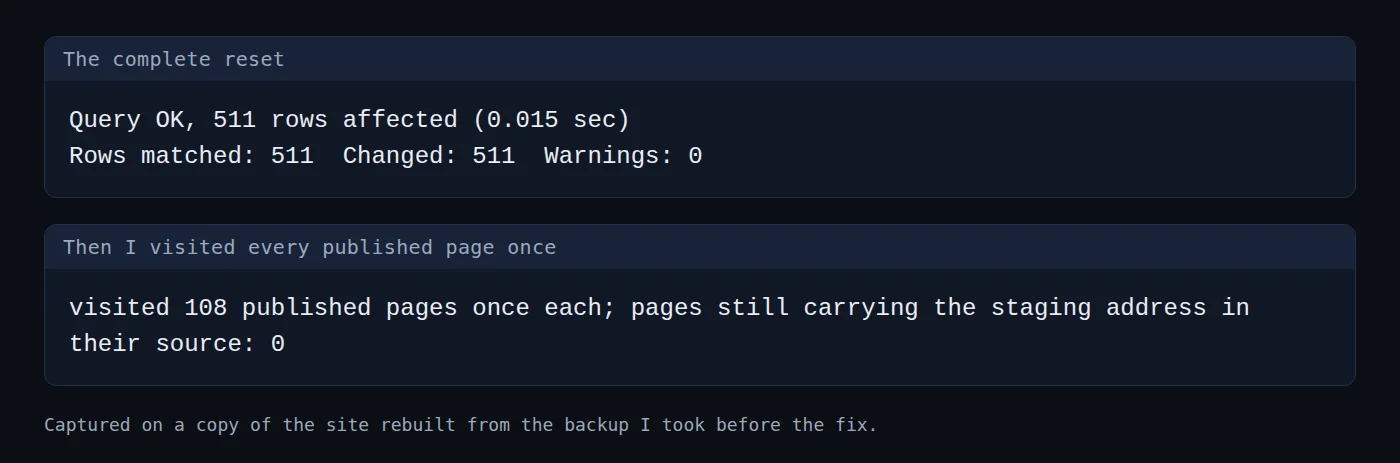
The rows rebuild only as their pages get visited, so permalink NULL stays high for a while. That is normal, and it is why the picture columns and the links table can still hold the old address. Steps 6 and 7 deal with those.
If you would rather not wait for visitors, Yoast has a WP-CLI command that rebuilds everything. Its own help says --reindex “removes all existing indexables and then reindexes them”:
wp yoast index --reindex
On my copy, with 108 published posts and pages, it finished in under two minutes. Afterwards no permalink or picture column held the staging address.
Two things it did not do. It rebuilds every row, including ones that were fine, and on a big site that takes a while. It also left 227 stale rows in the links table, so you still need the second statement in Step 7.
The picture columns and the links table hold real media addresses, so I kept them and swapped only the domain. If you did Step 6, the picture columns are already rebuilt and only the second statement, the one for wp_yoast_seo_links, matters. Running both is harmless:
UPDATE wp_yoast_indexable SET open_graph_image=REPLACE(open_graph_image,'staging.ceeveeglobal.com','ceeveeglobal.com'), twitter_image=REPLACE(twitter_image,'staging.ceeveeglobal.com','ceeveeglobal.com'), open_graph_image_meta=REPLACE(open_graph_image_meta,'staging.ceeveeglobal.com','ceeveeglobal.com') WHERE open_graph_image LIKE '%staging.ceeveeglobal%' OR twitter_image LIKE '%staging.ceeveeglobal%' OR open_graph_image_meta LIKE '%staging.ceeveeglobal%';
UPDATE wp_yoast_seo_links SET url=REPLACE(url,'staging.ceeveeglobal.com','ceeveeglobal.com') WHERE url LIKE '%staging.ceeveeglobal%';
You should see: the matched counts from Step 3. Mine were:
Query OK, 72 rows affected (0.007 sec)
Rows matched: 72  Changed: 72  Warnings: 0
Query OK, 384 rows affected (0.015 sec)
Rows matched: 384  Changed: 384  Warnings: 0
One warning. This only worked because the data in those columns is plain text or JSON. PHP stores serialized data with each string’s length inside it, like s:5:"hello";, so a plain find and replace on serialized data breaks it.
My database now held zero staging addresses. I reloaded the page and it still said staging.
That is the page cache. It saves a finished copy of every page, wrong canonical included, and keeps serving that copy without asking WordPress. On the real site, 599 files in the cache folder carried the staging address, and the cache held 376 pages in total. A cached copy of my homepage from 14 September already had it.
Clear the saved pages first, then WordPress’s own object cache, which is its short-term memory for values it has already looked up. These are the commands for WP Fastest Cache, with the paths from my install, so change the path to your own WordPress folder, or use your cache plugin’s Clear Cache button if you run a different one:
rm -rf /var/www/html/wp-content/cache/all/*
wp cache flush
You should see: Success: The cache was flushed. If you need a refresher, my guide on how to clear the cache on a WordPress site covers the other plugins.
Run the one-line check from Step 1 again. You should see your live address in both lines.
Then run the counting query from Step 3 again. Every staging line should read 0. On my copy, the homepage and five other pages had zero staging references after the cache was cleared.
I have to be straight about this. On my live site I didn’t know the complete reset would do it. I emptied the rows, saw the tag vanish, and wrote a small script that works out the real address for every row from whatever that row points at. I found the shorter fix afterwards, by reading Yoast’s source.
The script still works, and it is a fair option if you want every emptied row filled in right now without a full reindex. It never deletes a row. Save it as repair-permalinks.php and run wp eval-file repair-permalinks.php from your WordPress folder:
<?php
/**
 * Repopulate Yoast indexable permalinks that were nulled.
 *
 * Nulling the permalink was supposed to make Yoast rebuild it lazily (that is what its own
 * reset-permalinks routine does on a permalink-structure change). On this install it does not
 * rebuild on a front-end request — it simply renders no canonical at all, which is worse than the
 * wrong one. So the permalink is recomputed here from the object each row points at.
 *
 * permalink_hash must stay consistent with permalink: Yoast looks rows up by that hash, and its
 * format is strlen(permalink) . ':' . md5(permalink). Verified against the rows that still had
 * matching hashes before any changes were made.
 *
 * Read-then-write per row, with a count of what it could not resolve. Nothing is deleted.
 */

global $wpdb;

$rows = $wpdb->get_results(
    "SELECT id, object_type, object_sub_type, object_id
       FROM {$wpdb->prefix}yoast_indexable
      WHERE permalink IS NULL"
);

$fixed = 0;
$skipped = [];

foreach ( $rows as $r ) {
    $url = null;

    switch ( $r->object_type ) {
        case 'post':
            if ( $r->object_id ) {
                $p = get_post( (int) $r->object_id );
                // Only published/attachment-style objects have a meaningful public permalink.
                if ( $p ) {
                    $url = get_permalink( $p );
                }
            }
            break;

        case 'term':
            if ( $r->object_id ) {
                $link = get_term_link( (int) $r->object_id );
                if ( ! is_wp_error( $link ) ) {
                    $url = $link;
                }
            }
            break;

        case 'user':
            if ( $r->object_id ) {
                $url = get_author_posts_url( (int) $r->object_id );
            }
            break;

        case 'home-page':
            $url = home_url( '/' );
            break;

        case 'post-type-archive':
            if ( $r->object_sub_type ) {
                $link = get_post_type_archive_link( $r->object_sub_type );
                if ( $link ) {
                    $url = $link;
                }
            }
            break;

        case 'date-archive':
            $url = home_url( '/' );
            break;

        // 'system-page' (404, search) has no canonical of its own — left NULL deliberately.
    }

    if ( ! $url ) {
        $key = $r->object_type . ( $r->object_sub_type ? ':' . $r->object_sub_type : '' );
        $skipped[ $key ] = ( $skipped[ $key ] ?? 0 ) + 1;
        continue;
    }

    $wpdb->update(
        $wpdb->prefix . 'yoast_indexable',
        [
            'permalink'      => $url,
            'permalink_hash' => strlen( $url ) . ':' . md5( $url ),
        ],
        [ 'id' => (int) $r->id ]
    );
    $fixed++;
}

echo "repaired: $fixed\n";
echo "left NULL by type:\n";
foreach ( $skipped as $k => $n ) {
    echo "  $k: $n\n";
}

$remaining = (int) $wpdb->get_var( "SELECT COUNT(*) FROM {$wpdb->prefix}yoast_indexable WHERE permalink IS NULL" );
$staging   = (int) $wpdb->get_var( "SELECT COUNT(*) FROM {$wpdb->prefix}yoast_indexable WHERE permalink LIKE '%staging.ceeveeglobal%'" );
$hashok    = (int) $wpdb->get_var(
    "SELECT COUNT(*) FROM {$wpdb->prefix}yoast_indexable
      WHERE permalink IS NOT NULL AND permalink_hash = CONCAT(LENGTH(permalink),':',MD5(permalink))"
);
$notnull   = (int) $wpdb->get_var( "SELECT COUNT(*) FROM {$wpdb->prefix}yoast_indexable WHERE permalink IS NOT NULL" );

echo "\nstill NULL: $remaining\n";
echo "still staging: $staging\n";
echo "hash consistent: $hashok of $notnull non-null\n";
On my copy it repaired 512 rows and left 47 empty. Those 47 are system pages such as the 404 page and search results, which never had a canonical.
wp yoast index after a half reset. On my copy it added three rows and left every emptied row empty. Use --reindex, or set version to 0 as in Step 5.View the page source of your homepage and search for canonical. If the address is a staging, localhost or old domain, run the counting query from Step 3 to see how many rows in Yoast’s table still hold it.
I didn’t measure any change in rankings, so I can’t tell you it did. Google describes a canonical link as “a strong signal”, so a dead staging address is the wrong thing to hand it.
Yoast runs its reset when the home address option is updated. Why that didn’t happen on my site, I don’t know. I can’t tell how the old addresses got into the table, so I’m not going to guess.
I only tested this on a recent Yoast SEO release with WP Fastest Cache active. Another SEO plugin or another cache, or an older Yoast version, might store or serve the address differently, so check its own tables and cache before copying these steps.
I ran the script from the last section on my live site after backing up both tables. The complete reset and the reindex I only tested on the copy. Try either one on a copy of your own site first.
The wrong address wasn’t in any setting. It was in Yoast’s own table, half a reset made it worse, and the page cache kept serving it after I fixed it.
If a page ever refuses to change after you fix it, my guide to the WordPress White Screen of Death shows another case where the fix was right and something else was in the way.