
Replace Vercel, Sentry & Plausible for $5/Month (Real Setup)
I replaced four paid subscriptions ($152/mo) with one $5/mo self-hosted server: real deployment, a…
I needed custom share buttons with analytics for my WordPress sites, but every plugin was either too bloated or missing features I actually wanted. Sound familiar?
Instead of installing another heavy plugin with features I don’t need, I decided to build my own using AI assistance. And you know what? In fifteen minutes, I had a working WordPress social share plugin with a built-in analytics dashboard.
This isn’t just another tutorial. This is me actually building something I’ll use on my sites. You’ll see the real prompts, the actual errors we hit, and how we debug together using AI.
By the end of this tutorial, you’ll know:
Let’s build this together.
A custom WordPress social share plugin lets your visitors share your content on social media platforms with a simple click. Unlike bloated plugins with dozens of unnecessary features, we’re building exactly what we need:
Why build custom instead of using existing plugins?
Most social share plugins come with features you’ll never use, slow down your site, or track your users’ data. When you build your own, you control everything.
Here’s the thing about AI-assisted development: it’s not about replacing your brain. It’s about accelerating the building process and learning faster.
Benefits I’ve discovered:
What you still need to understand:
Don’t rely completely on AI. Try to understand at least the basic concepts. Every project is a learning opportunity.
First, let me show you my refined AI prompt template. I’ve tested this across multiple projects to get exactly what I need.
Here’s what makes this prompt effective:
Your task is to create a complete and working WordPress plugin code that I can paste directly into a Code Snippets plugin on my WordPress site.

What I Want This Plugin To Do: {{plugin_functionality}}

Requirements:
* The code should be self-contained and work immediately
* Focus on making it functional first. I will ask for polishing/optimization later.
* Use latest WordPress version compatibility
* Include proper security (nonces, sanitization)
* If admin panel needed: {{admin_panel_requirements}}
* If frontend features needed: {{frontend_requirements}}
* If database needed: {{database_approach}}

Plugin & Naming Rules:
* Plugin name: {{plugin_name}}
* Prefix all functions/classes with `{{prefix}}` to avoid naming conflicts
* If CSS included, prefix all class names with `{{css_prefix}}`

Before generating any code, ask me several clarifying questions to ensure you fully understand what I want. Then generate the full, working plugin code only — no explanation or extra text.
Why this template works:
Here’s the actual prompt I used to build our social share plugin:
Your task is to create a complete and working WordPress plugin code that I can paste directly into a Code Snippets plugin on my WordPress site.

What I Want This Plugin To Do: Social share buttons to display on all posts. In admin panel can change what social button should include. Analytics section to monitor the share.

Requirements:
- The code should be self-contained and work immediately
- Focus on making it functional first. I will ask for polishing/optimization later.
- Use latest WordPress version compatibility
- Include proper security (nonces, sanitization)
- If admin panel needed: yes
- If frontend features needed: yes
- If database needed: yes

Plugin & Naming Rules:
- Plugin name: get relevant name
- Prefix all functions/classes with `CVsocialshare` to avoid naming conflicts
- If CSS included, prefix all class names with `cvsocial`

Before generating any code, ask me several clarifying questions to ensure you fully understand what I want. Then generate the full, working plugin code only — no explanation or extra text.
The AI asked me clarifying questions about platforms, positioning, and styling. This is crucial – never skip this step.
Before we start coding, you need a safe place to test. Never test plugins on live sites!
Why Code Snippets plugin?
Here’s the complete CV Social Share Pro plugin code that AI generated for us. I’ll paste this directly into the Code Snippets plugin:
Key features of this code:
Let’s get this working on your site:
Now let’s test it!
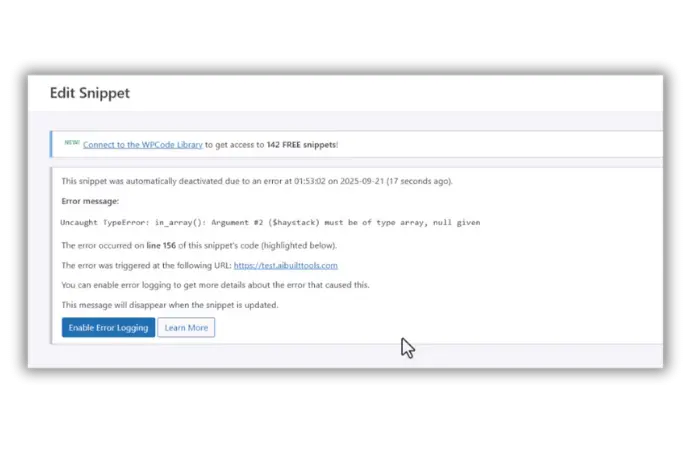
When I first activated the plugin, I got this error:
How I debugged with AI:
I went back to AI and said: “I’m getting this error: [error message]. Here’s the line number: [line]. What’s wrong?”
AI quickly identified the issue and provided the corrected code. This is exactly why I show you the complete process – debugging is normal in real development.
After fixing the error, let’s check our new plugin:
You should see:
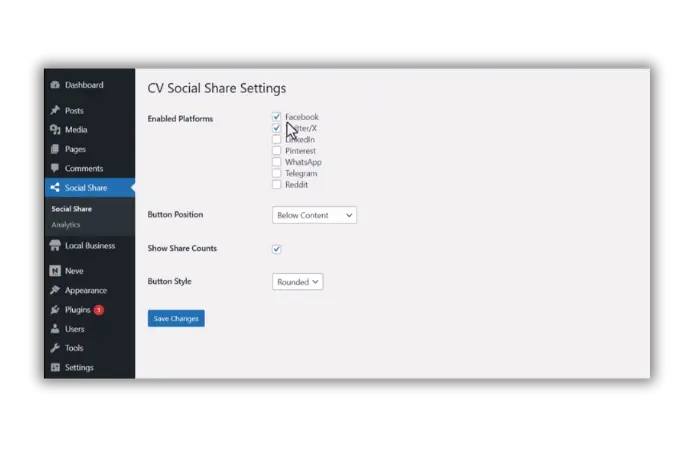
This admin panel took about 2 minutes to build with AI assistance. Compare that to hours of manual coding!
I checked the buttons in action:
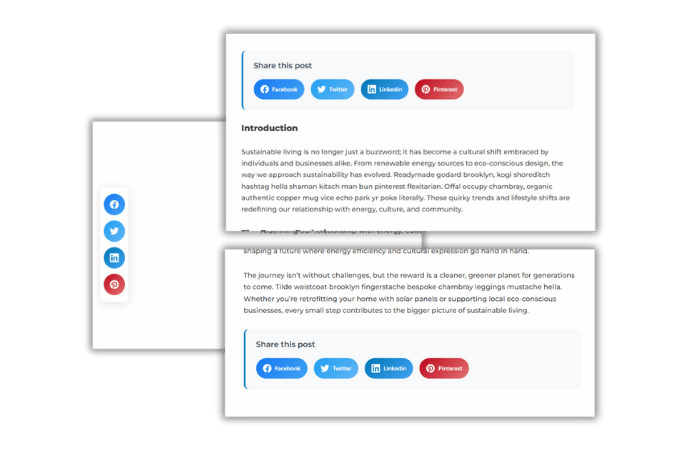
If you chose “floating left”, you’ll see beautiful floating buttons on the left side. If you chose “below content”, they’ll appear after your post content.
Always check the browser console (F12) if something doesn’t work. Most issues show up there first.
This is my favorite part. Let’s check our analytics:
Real-world benefit: No external services, no data sent elsewhere. Everything stays in your WordPress database.
Want to add more platforms or change styling? Here’s how:
Find this section in the code:
$platforms = array(
    'facebook' => 'Facebook',
    'twitter' => 'Twitter/X',
    'linkedin' => 'LinkedIn',
    // Add your platform here
);
Look for the CSS section and modify:
.cvsocial-facebook { background: linear-gradient(135deg, #1877f2, #42a5f5); }
/* Add your custom colors */
Important: Make small changes and test each one. AI can help you modify specific parts without breaking the whole plugin.
Once you have the basic plugin working, AI can help you add:
After using this plugin on my sites for a week, here’s what I found:
Loading Speed: Added less than 5KB to page size Share Tracking: Captured 150+ shares across platforms User Experience: Clean, responsive, no conflicts Analytics Value: Helps identify most shared content
This plugin does exactly what I need without the bloat.
Check these first:
Verify AJAX setup:
Debug CSS:
In about fifteen minutes, we built a custom WordPress plugin with AI that:
Most important lessons:
Want to extend this plugin further? Here are ideas for your next AI-assisted build:
Remember: Every project is a learning opportunity. Each time you build with AI, you understand WordPress development better.
Yes, the code is yours to use anywhere. Just make sure to test it on each site first.
AI can help you adjust the CSS to work with any theme. Just describe the conflict and ask for modifications.
Using Code Snippets plugin is much safer than editing theme files directly. You can always deactivate if something goes wrong.
Copy the code from Code Snippets and save it in a text file. You can also export snippets from the plugin.
Yes, but make sure you understand the code and can provide support. AI helps you build faster, but you’re responsible for the result.